Skip to content
Tesselion Handleiding
  • Home
  • Handbook
  • Contact
To tesselion.com Search
EN Language: English
  • Nederlands NL
  • Français FR
  • English EN

This website only uses functional cookies: to remember the language you choose and to secure forms. We do not track you and use no advertising or analytics cookies.

OK
Contents
  1. Getting started
    1. Welcome to Tesselion
    2. Signing in to the admin
    3. Finding your way around the admin
    4. Creating your first website
    5. Putting your website online
  2. Pages
    1. Creating and organising pages
    2. The menu
    3. Sections and columns
    4. Blocks
    5. Images and files
    6. Drafts, preview and publishing
    7. Languages and translation
    8. Address and search engines (SEO)
    9. Redirects
    10. Fixed texts of the site
  3. Design
    1. Choosing a theme
    2. Colours and fonts
    3. Logo and favicon
    4. The header
    5. The footer
    6. Building your own header and footer
    7. The Own theme
  4. Domains
    1. Connect your own domain
    2. DNS settings
    3. Secure connection (https)
  5. Modules
    1. What are modules?
    2. Website (always on)
      1. Website (core module)
    3. In the plans
      1. Forms
      2. Gallery
      3. Company
      4. Social media
      5. FAQ
      6. Privacy
      7. Posts
      8. Services
      9. Projects
      10. Reviews
      11. Downloads
      12. Jobs
      13. Prices
      14. Links
      15. Key figures
      16. Mail
      17. Knowledge base
      18. API data
      19. Image bank
    4. Site management
      1. Site management
      2. Statistics
      3. SEO
      4. Accessibility
      5. Availability
      6. Maintenance
      7. Content planning
      8. Feedback
    5. Riding school / Stable
      1. Horses
      2. Horses: for sale
      3. Lessons
      4. Appointments
      5. Accounts
      6. Members
      7. Stabling
      8. Competitions
      9. Competitions: entries and payment
      10. Competitions: start list and score sheets
      11. Competitions: results, prizes and rankings
      12. Competitions: secretariat and staffing
      13. Competitions: sponsors
      14. Competitions: page layout
      15. Courses
    6. Accountant
      1. Tax calendar
      2. Calculators
    7. Association
      1. Events
      2. Volunteers
      3. Non-profit association
      4. Federation
      5. Sponsors
    8. Retail / Hospitality
      1. Gift vouchers
      2. Menu
    9. Community
      1. Library
      2. Matchmaking
      3. Game info
      4. Collection
  6. Importing and site packages
    1. Import an existing website
    2. Site packages
  7. Users and security
    1. Inviting users
    2. Roles and permissions
    3. Your account and profile
    4. Two-step verification
    5. Reviewing your sign-ins
  8. Subscription
    1. Plans and packs
    2. Order or change your subscription
    3. Customer and billing details
    4. Trial and usage
  9. Privacy and GDPR
    1. Cookies
    2. The privacy statement
    3. Data and retention periods
  10. Questions and troubleshooting
    1. Frequently asked questions
    2. Troubleshooting
  11. For platform administrators
    1. Platform administration
    2. Showing the plans on a website
  1. Getting started
    1. Welcome to Tesselion
    2. Signing in to the admin
    3. Finding your way around the admin
    4. Creating your first website
    5. Putting your website online
  2. Pages
    1. Creating and organising pages
    2. The menu
    3. Sections and columns
    4. Blocks
    5. Images and files
    6. Drafts, preview and publishing
    7. Languages and translation
    8. Address and search engines (SEO)
    9. Redirects
    10. Fixed texts of the site
  3. Design
    1. Choosing a theme
    2. Colours and fonts
    3. Logo and favicon
    4. The header
    5. The footer
    6. Building your own header and footer
    7. The Own theme
  4. Domains
    1. Connect your own domain
    2. DNS settings
    3. Secure connection (https)
  5. Modules
    1. What are modules?
    2. Website (always on)
      1. Website (core module)
    3. In the plans
      1. Forms
      2. Gallery
      3. Company
      4. Social media
      5. FAQ
      6. Privacy
      7. Posts
      8. Services
      9. Projects
      10. Reviews
      11. Downloads
      12. Jobs
      13. Prices
      14. Links
      15. Key figures
      16. Mail
      17. Knowledge base
      18. API data
      19. Image bank
    4. Site management
      1. Site management
      2. Statistics
      3. SEO
      4. Accessibility
      5. Availability
      6. Maintenance
      7. Content planning
      8. Feedback
    5. Riding school / Stable
      1. Horses
      2. Horses: for sale
      3. Lessons
      4. Appointments
      5. Accounts
      6. Members
      7. Stabling
      8. Competitions
      9. Competitions: entries and payment
      10. Competitions: start list and score sheets
      11. Competitions: results, prizes and rankings
      12. Competitions: secretariat and staffing
      13. Competitions: sponsors
      14. Competitions: page layout
      15. Courses
    6. Accountant
      1. Tax calendar
      2. Calculators
    7. Association
      1. Events
      2. Volunteers
      3. Non-profit association
      4. Federation
      5. Sponsors
    8. Retail / Hospitality
      1. Gift vouchers
      2. Menu
    9. Community
      1. Library
      2. Matchmaking
      3. Game info
      4. Collection
  6. Importing and site packages
    1. Import an existing website
    2. Site packages
  7. Users and security
    1. Inviting users
    2. Roles and permissions
    3. Your account and profile
    4. Two-step verification
    5. Reviewing your sign-ins
  8. Subscription
    1. Plans and packs
    2. Order or change your subscription
    3. Customer and billing details
    4. Trial and usage
  9. Privacy and GDPR
    1. Cookies
    2. The privacy statement
    3. Data and retention periods
  10. Questions and troubleshooting
    1. Frequently asked questions
    2. Troubleshooting
  11. For platform administrators
    1. Platform administration
    2. Showing the plans on a website

← Handbook

Pages

Sections and columns

Build a page from sections and columns, and set the width, spacing, background and height of each section.

On this page

  • Adding a section
  • Section settings
  • Moving or removing sections
  • See also

A page is made of sections: horizontal bands, one below the other. Each section has one or more columns, and in each column you place blocks (text, image, buttons…). You work in the Layout tab of a page.
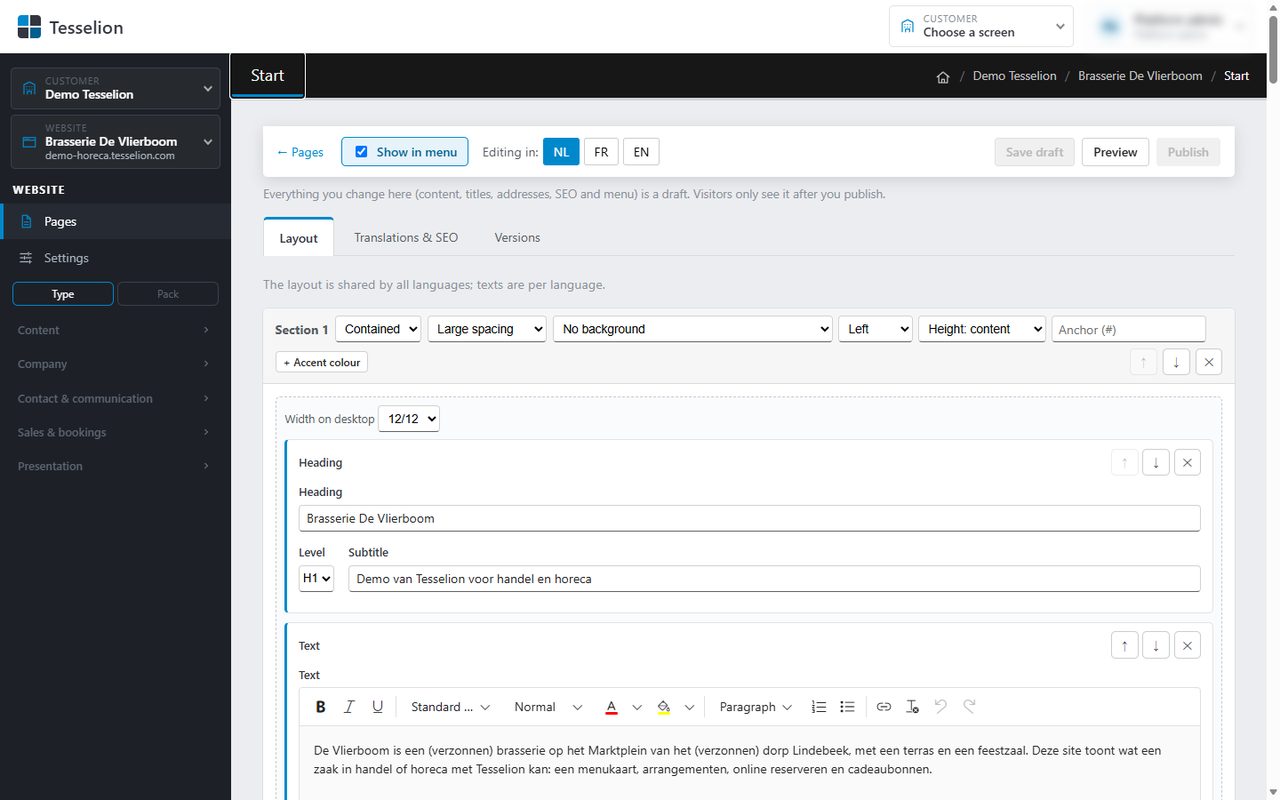
The page builder, with sections and blocks

Adding a section

  1. Open the page from Pages; the Layout tab is open.
  2. At the bottom, next to + Add section, pick a column layout: 1, ½ ½, ⅓ ⅓ ⅓, ⅔ ⅓, ⅓ ⅔ or ¼ ¼ ¼ ¼.
  3. Add blocks to each column with + Add block.
  4. Click Save draft, or go straight to Publish.

For each column, Width on desktop sets how many twelfths of the width it takes (1/12 to 12/12). On a phone, columns are stacked.

Section settings

The header row of every section has a few drop-downs:

  • Width: Contained or Full width (edge to edge).
  • Spacing: from No spacing to Large spacing above and below the section.
  • Background: No background, Primary colour, Accent colour (the site's second colour), Light, Dark or Photo (white text, headings in the main colour).
  • Alignment: Left or Centred.
  • Minimum height: from Height: content to Height: full screen (or Height: rest of the screen, which runs to the bottom of the screen from where the section starts, e.g. a photo below the header), handy for a large opening section.
  • Anchor (#): a short name so that a button or link can jump straight to this section (e.g. #prices).
  • + Accent colour: a colour of your own that replaces the site's main colour in this section.

Note: With Photo you cannot pick a background image in the layout itself: the section gets a dark background with white text. An actual background photo only comes along with an imported website.

Moving or removing sections

Use ↑ and ↓ on the right of the header row to move a section; ✕ (Remove section) removes it, together with its blocks.

Tip: The layout is shared by all languages; only the texts differ per language. So you only need to build the sections once.

See also

  • Blocks
  • Colours and fonts
  • Drafts, preview and publishing

Last updated on 20 November 2026

Previous The menuNext Blocks

The Tesselion handbook: building and managing websites, step by step.

Contact

Email: support@tesselion.com

Useful links

  • Handbook
  • Demo
  • tesselion.com
  • Contact
© Copyright 2026 by Tesselion. All rights reserved.Powered by Acronda built on Tesselion