Subscription
Order or change your subscription
Order another plan or extra packs under Subscription; the change takes effect once Tesselion confirms it.
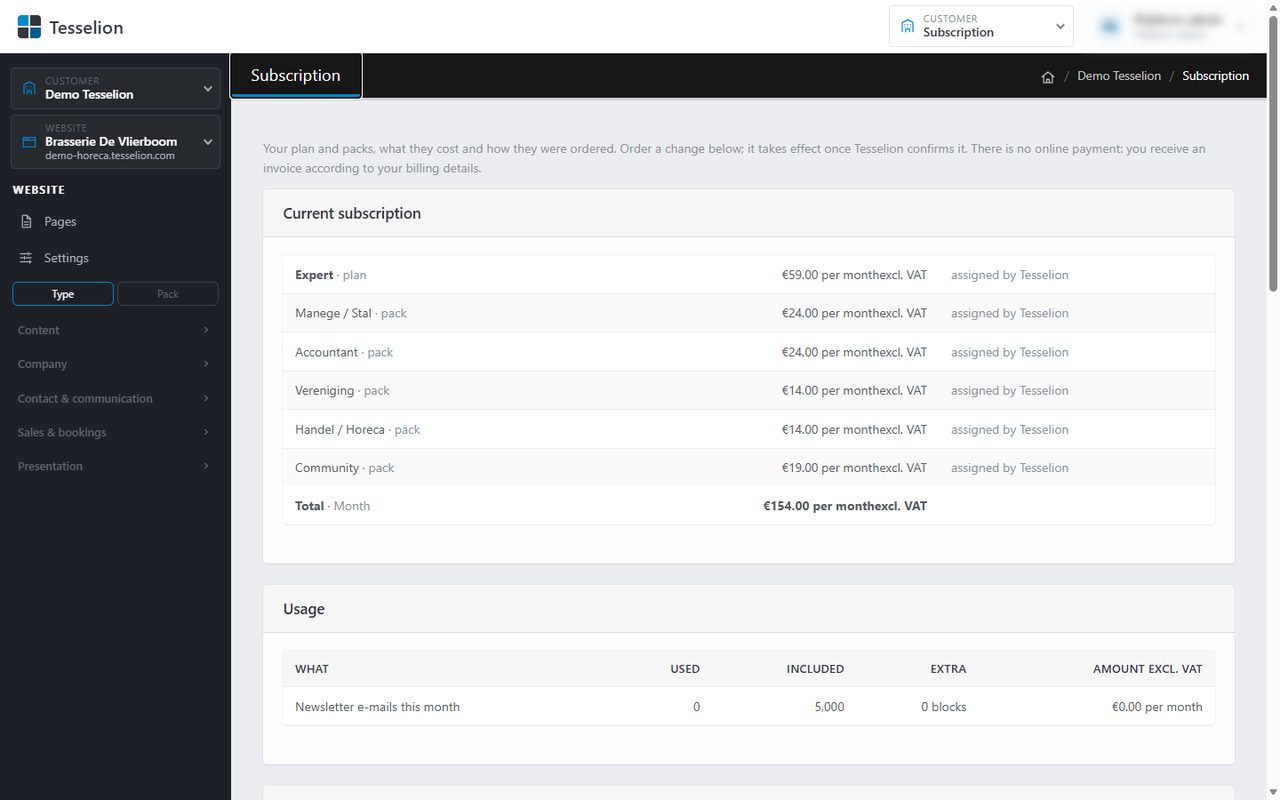
The Subscription screen shows your plan and packs, what they cost and how they were ordered. This is also where you order a change. An order is a request: it only takes effect once Tesselion confirms it. There is no online payment; you receive an invoice according to your billing details.
When you sign up
If you choose a plan and packs on the Tesselion website and then sign up, that choice becomes your first order (marked at signup). Tesselion confirms it as well; you can change it later under Subscription.
Order a change
- At the top right, click Customer admin and then Subscription.
- Under Order a change, choose the plan you want under Plan.
- Tick the Packs and Light packs you want. The number the chosen plan allows is shown.
- Choose the Billing period: Month or Year.
- Optionally add a Remark for Tesselion.
- Click Place order.
The order appears with the status Requested, showing per line what is added, removed or kept. You receive an email once it is confirmed.
Note: Only one order can wait for confirmation at a time. To change your mind, first click Withdraw order and then order again.
After the decision
Under Orders you see all your orders with their status: Requested, Confirmed, Rejected or Withdrawn, plus any Reply from Tesselion. Confirming applies the plan, packs and billing period.
Tip: If a pack is removed, its modules stay on your sites until Tesselion switches them off. New modules from a plan or pack are then switched on by you under Modules.
Only the owner of the customer account sees the Subscription screen.
See also
Last updated on 20 November 2026