Pages
Fixed texts of the site
Change the fixed texts visitors see, such as “Read more” or a thank-you message, per language.
Besides your own content, the site shows fixed texts: buttons such as “Read more”, messages and the thank-you text after a form. Tesselion has a standard text in every language, but you can replace it with your own words for each site.
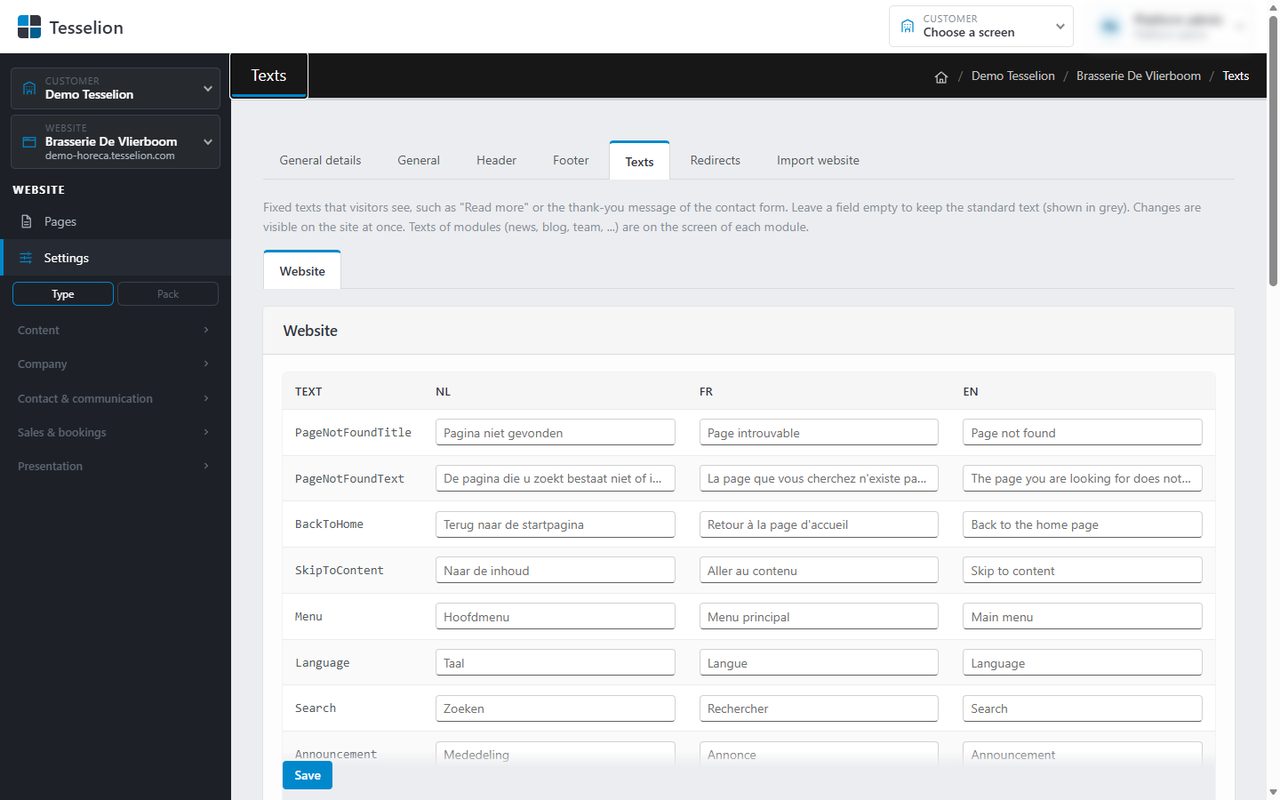
Changing a fixed text
- Choose your website on the left and go to Settings → Texts.
- Pick the tab at the top: Website for the general texts, or a module that is enabled on your site.
- Find the text in the table. Each language has a field; the standard text is shown in grey.
- Type your own text in the field for that language.
- Click Save. The change is visible on the site straight away.
A number next to a tab shows how many texts you have already replaced there.
Back to the standard text
Empty the field and click Save. The site shows the standard text again.
Tip: Only replace what really needs to be different. That way you benefit from improvements to the standard texts, and your translations stay consistent.
Module texts
Not every module appears on this screen. Modules with a screen of their own (such as posts or team) keep their texts on that screen.
Note: Enter a replacement text for every language of your site. If you leave a language empty, visitors in that language get the standard text, not your version.
See also
Last updated on 20 November 2026