Domains
Connect your own domain
Connect your own domain name, such as www.yourcompany.com, to your website and make it the main address.
When you create a website it gets an address on the platform's domain, which works straight away. If you want visitors to find your site under your own domain name, add that domain in the admin. Your own domain only becomes active once a DNS check has proven that it is yours and that it points to the Tesselion server.
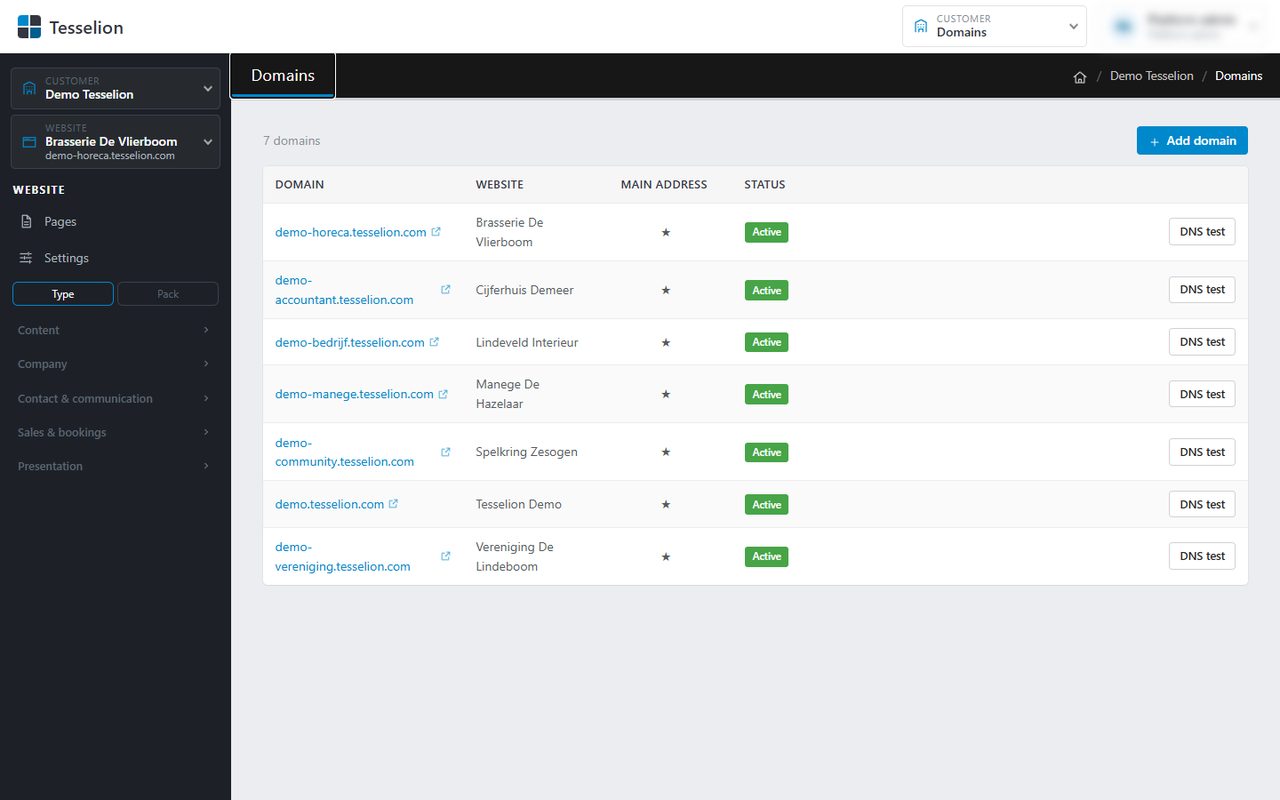
Add a domain
- At the top right, click Customer admin and then Domains. You see the domains of all your websites in one table.
- Click Add domain.
- Under Website, choose the site the domain belongs to and enter the name under Domain, e.g.
www.example.com. - Optionally tick Not active yet if you want to add the domain now and activate it later.
- Click Add. The domain gets the status Awaiting check.
The check
For a domain that is waiting, the screen shows the records you need to create at your domain registrar (see DNS settings). The check runs automatically every few minutes; Check now runs it straight away. Once everything is correct, the domain becomes Active.
Note: After a week without correct records, a domain that is still waiting is removed. You can simply add it again afterwards.
Choose the main address
A website can have several domains; one of them is the main address (marked with a star). Visitors on the other addresses are redirected to the main address.
- Find the active domain in the table.
- Click Make main address.
For a domain that is not the main address, you can also click Deactivate (the website no longer answers on it), Activate it again, or remove it with the cross. The main address itself cannot be deactivated or removed: make another domain the main address first.
Tip: To have both example.com and www.example.com work, add both and make one of them the main address. The DNS test button shows you at any time where a domain points to.
The Domains screen is available to the owner of the customer account.
See also
Last updated on 20 November 2026